The capital letter version of the game is finished!
I recorded a male voice for the auditory version yesterday which I will edit and put into the game today. I have made arrangements to record a child's voice and hopefully for the preloader with the ABCs I will be able to add the ABC song which the child will also record. I looked online for a free sound file of it but much to my amazement there is porn attached to that search topic.:(
Friday, January 06, 2006

Wednesday, January 04, 2006
Brown Bear, Brown Bear
I saw something today that reminded me of the book Brown Bear, Brown Bear, What do You See? It's very popular in kindergarten and 1st grades. They usually read the book and then make a class book following the same format.
I thought of a two ways to do that using sign language, both using technology.
Idea 1-Using a digital camera photograph each child full body. Remove the background from around the child on the computer and make a picture with two children. Photograph the first child signing "I see (child's name) following me" and put that on the bottom of the page. On the next page add a third child to the line of children and have the second child sign the sentence.
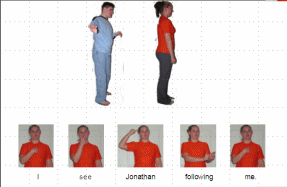
Idea 2-Using a digital camera photograph each child full body. Remove the background from around the child on the computer and make a picture with two children on a powerpoint slide. Videotape the first child signing "I see (child's name) following me" and put that on the bottom of the page. On the next page add a third child to the line of children and have the second child sign the sentence. Here's a rough idea of what I mean. I just did it real fast in flash to get the idea since Powerpoint doesn't post video online.
I thought of a two ways to do that using sign language, both using technology.
Idea 1-Using a digital camera photograph each child full body. Remove the background from around the child on the computer and make a picture with two children. Photograph the first child signing "I see (child's name) following me" and put that on the bottom of the page. On the next page add a third child to the line of children and have the second child sign the sentence.
Idea 2-Using a digital camera photograph each child full body. Remove the background from around the child on the computer and make a picture with two children on a powerpoint slide. Videotape the first child signing "I see (child's name) following me" and put that on the bottom of the page. On the next page add a third child to the line of children and have the second child sign the sentence. Here's a rough idea of what I mean. I just did it real fast in flash to get the idea since Powerpoint doesn't post video online.
Monday, January 02, 2006
Kool Kids Sign and ABC Game
Bad news. I finished reading the grant information and Kool Kids Sign does not qualify for a grant. Maybe some day I will find a grant.
I worked on the ABC game again today. I made a capital letter version and a matching capital and lowercase version. I ran into a problem with some of the capital letters being too big. I need to go back through and adjust the background to accomodate that. I tried just changing the size of the font but it doesn't look right. Maybe by tomorrow night I will be done and can post it to the Kool Kids Sign website. Then I will burn a cd for Ruth who took time to let me videotape her for the game. I will also send Rosemary the final version too. And finally one of the preschool teachers asked for a capital letter version so I need to make her one too.
Oh I forgot. I wanted to make an aural version for the hard of hearing and cochlear implant kids. I still need to do that too. I guess I will hold off on the cd's for now. I had talked to our Auditory Verbal teacher about that version. I think I want to make a female, male and child version of the words and letters. I need to make a list of what I want to record and then find people to do them. Maybe I will use my daughter for the female version.
BTW Saturday I take the Praxis reading, writing and math test to prove to the state that I can do those things so I can get my certification for instructional technology. I'll know there if I pass the reading and math but I will have to wait for the writing score. I'm a little worried about the writing part. I am not a strong writer and looking at many of the sample questions I would not know what to write.
I worked on the ABC game again today. I made a capital letter version and a matching capital and lowercase version. I ran into a problem with some of the capital letters being too big. I need to go back through and adjust the background to accomodate that. I tried just changing the size of the font but it doesn't look right. Maybe by tomorrow night I will be done and can post it to the Kool Kids Sign website. Then I will burn a cd for Ruth who took time to let me videotape her for the game. I will also send Rosemary the final version too. And finally one of the preschool teachers asked for a capital letter version so I need to make her one too.
Oh I forgot. I wanted to make an aural version for the hard of hearing and cochlear implant kids. I still need to do that too. I guess I will hold off on the cd's for now. I had talked to our Auditory Verbal teacher about that version. I think I want to make a female, male and child version of the words and letters. I need to make a list of what I want to record and then find people to do them. Maybe I will use my daughter for the female version.
BTW Saturday I take the Praxis reading, writing and math test to prove to the state that I can do those things so I can get my certification for instructional technology. I'll know there if I pass the reading and math but I will have to wait for the writing score. I'm a little worried about the writing part. I am not a strong writer and looking at many of the sample questions I would not know what to write.
Sunday, January 01, 2006
Kool Kids Sign
Kool Kids Sign in a concept I came up with a couple years ago while interpreting for a deaf middle school student. My idea was a combination of a daily video segment and a website. The daily video segment would be only a few minutes long and would teach sign language over the school's closed circuit tv during homeroom. Along with that I thought a website would be a good idea to reinforce the daily lessons. If the schools did not have a closed circuit tv system then the tape could be shown in individual classrooms.
Well the student I was working with and a friend of hers filmed a couple weeks of video to show in school but the website never really got started. I found that I can draw some what but I am so slow that the pictures that I drew never were posted. Then I found out about Sign Smith Studio. It's an authoring program using sign language and avatars that would allow me to post the words I wanted online and moving (my drawings were not animated.) Unfortunately Sign Smith Studio is expensive, as are all authoring programs, and I could never afford it.
I may have finally found a possible way to get it. I found out about a grant that I may be able to qualify for that might work. I had thought about grants before but none would really work. The only thing is that I don't know if I would be able to sell the videos or not-which would be the ideal way to spread the program to different schools.
I came up with this idea because so many deaf students are mainstreamed with interpreters these days. As they get older they really don't want an adult around all of the time and to be perfectly honest there are somethings I really didn't want to know. By creating a way for the hearing students to learn sign language the interpreters may be able to step back. The ideal, of course, would be for the deaf student to teach their friends but many are too shy to do so. A lot of times the hearing kids will learn the alphabet and that is all. Also only the immediate friends tend to learn any sign. With this program the whole school would be able to learn signs.
The program starts off with the alphabet, then goes on to teach common phrases or requests-such as do you have paper, pencil etc. It does not concentrate on American Sign Language per se but more on functional vocabulary.
I will post my write up for the grant online as I try to refine it for the final version.
Well the student I was working with and a friend of hers filmed a couple weeks of video to show in school but the website never really got started. I found that I can draw some what but I am so slow that the pictures that I drew never were posted. Then I found out about Sign Smith Studio. It's an authoring program using sign language and avatars that would allow me to post the words I wanted online and moving (my drawings were not animated.) Unfortunately Sign Smith Studio is expensive, as are all authoring programs, and I could never afford it.
I may have finally found a possible way to get it. I found out about a grant that I may be able to qualify for that might work. I had thought about grants before but none would really work. The only thing is that I don't know if I would be able to sell the videos or not-which would be the ideal way to spread the program to different schools.
I came up with this idea because so many deaf students are mainstreamed with interpreters these days. As they get older they really don't want an adult around all of the time and to be perfectly honest there are somethings I really didn't want to know. By creating a way for the hearing students to learn sign language the interpreters may be able to step back. The ideal, of course, would be for the deaf student to teach their friends but many are too shy to do so. A lot of times the hearing kids will learn the alphabet and that is all. Also only the immediate friends tend to learn any sign. With this program the whole school would be able to learn signs.
The program starts off with the alphabet, then goes on to teach common phrases or requests-such as do you have paper, pencil etc. It does not concentrate on American Sign Language per se but more on functional vocabulary.
I will post my write up for the grant online as I try to refine it for the final version.
Monday, December 12, 2005
The Comfort Zone
I really like my comfort zone but today listening to the radio I was hit by a sentence that I heard.
They had been talking about things and I was not really paying attention except that I heard something and started thinking how I would sign it in American Sign Language (the radio is where I always hear things that I wonder how to sign.) Anyway I suddenly heard a statement that was made about how our dreams are not in our comfort zone.
I have spent several years working towards a dream. When I began grad school I wasn't even sure what I could do with the degree I was pursuing but I was very interested in the subject matter. Well, I've finally graduated after having a fantastic 6 weeks at the Clerc Center doing my internship. When I left there I was all ready to change jobs.
I'm home now and I've fallen back into my comfort zone. It's really comfortable here so much so that I fear I will stay right where I am. But my dream is not here. I have to leave my comfort zone and find my dream. I'm scared and I have no idea how or where to find it. I was ready to move to a new location this summer but then I came home and reality hit. I don't see how I can move. I have support services for my son here. To move would mean starting all over again. I can't work without the support services and there would be no time to establish them. I don't see any possibilities around here. But God put that little statement in my ear today for a reason. Maybe there will be a job somewhere that I don't have to relocate to. I have to keep on following through. There are two schools for the deaf near here (well sort of.) I planned to apply as a teacher but I don't think I can get certified in New Jersey (can't remember why right now) and I don't think the one here in PA will pay enough to cover my bills with the added cost of the commute (at least an hour) so I guess I just apply for my dream? Would God make it that easy?
I thought about sending my resume to the School of the Future that is opening up in Philadelphia this year but there were two problems.
1. The principal is a well known tech leader and my insecurities made that intimidating. (see my blog from August 19)
and
2. It would be really cool to work there (if they were even hiring an instructional technologist) BUT It's not my dream. My dream is to be an instructional technologist in a school for the deaf.
Maybe I'm reading more into this than is really there. Maybe this was not a nudge to move me out of my comfort zone that I like so well. It really is nice here:)
(I did sign up to take the Praxis test to prove to the state of Pennsylvania that I can do math, read and write. First step to applying for the Instructional Technology Specialist certification in PA even though I don't see how I will ever get a job.)
They had been talking about things and I was not really paying attention except that I heard something and started thinking how I would sign it in American Sign Language (the radio is where I always hear things that I wonder how to sign.) Anyway I suddenly heard a statement that was made about how our dreams are not in our comfort zone.
I have spent several years working towards a dream. When I began grad school I wasn't even sure what I could do with the degree I was pursuing but I was very interested in the subject matter. Well, I've finally graduated after having a fantastic 6 weeks at the Clerc Center doing my internship. When I left there I was all ready to change jobs.
I'm home now and I've fallen back into my comfort zone. It's really comfortable here so much so that I fear I will stay right where I am. But my dream is not here. I have to leave my comfort zone and find my dream. I'm scared and I have no idea how or where to find it. I was ready to move to a new location this summer but then I came home and reality hit. I don't see how I can move. I have support services for my son here. To move would mean starting all over again. I can't work without the support services and there would be no time to establish them. I don't see any possibilities around here. But God put that little statement in my ear today for a reason. Maybe there will be a job somewhere that I don't have to relocate to. I have to keep on following through. There are two schools for the deaf near here (well sort of.) I planned to apply as a teacher but I don't think I can get certified in New Jersey (can't remember why right now) and I don't think the one here in PA will pay enough to cover my bills with the added cost of the commute (at least an hour) so I guess I just apply for my dream? Would God make it that easy?
I thought about sending my resume to the School of the Future that is opening up in Philadelphia this year but there were two problems.
1. The principal is a well known tech leader and my insecurities made that intimidating. (see my blog from August 19)
and
2. It would be really cool to work there (if they were even hiring an instructional technologist) BUT It's not my dream. My dream is to be an instructional technologist in a school for the deaf.
Maybe I'm reading more into this than is really there. Maybe this was not a nudge to move me out of my comfort zone that I like so well. It really is nice here:)
(I did sign up to take the Praxis test to prove to the state of Pennsylvania that I can do math, read and write. First step to applying for the Instructional Technology Specialist certification in PA even though I don't see how I will ever get a job.)
Saturday, December 10, 2005
The Negative Side of Blogs
While I have been pushing blogs at work and potentially to the state of Pennsylvania's teachers of the Deaf and Hard of Hearing, I have recently seen the negative side of blogs.
My son has Angelman Syndrome. Wikipedia describes Angelman Syndrome as a "neurological disorder in which severe learning difficulties are associated with a characteristic facial appearance and behavior." When my daughter was younger I created a website for siblings, called Angel Land, with games and a chance to talk about their siblings with Angelman Syndrome.
Recently a parent found a blog that used part of my website (Angel Sib Thoughts page) to ridicule children with the syndrome. They quoted from what the siblings had posted, not always in its entirety, and mocked the children. The person also made fun of the fact that one of the children died when he was trapped in a recliner.
Needless to say there was an uproar among the parents to the extent that some contacted the dean of the university where this person attended. The school of course could do nothing since it was not school related. The person has removed the original post and is now just referring readers to the website implying that they can read into it what they will. I have also recently found another post that quoted the children with no comments except in the comments section(I have not told the other parents about that one.)
As a result I have begun changing the content to say that the page no longer exists because of the blogs which link to that specific page. For now I have kept the content by changing the name of the page and I am starting to go through the whole site changing the links. I thought that Dreamweaver would do that when I changed the name but it didn't.
I feel really bad about these incidents. I wrote an email apologizing to the parents and offering to take the page down or password protect it. Of the replies I got all said to leave it there. I am sure that the people that are quoting from my site are violating copyright laws but financially it is not worth pursuing.
Of greater concern as far as I am concerned is the issue of quoting underage children, with derogatory comments added, who have posted to my site with parent permission. I really researched the issue of children's privacy when I updated the site for one of my grad school classes and came to the conclusion that it was legal to have the page. To protect the children I have never used more than their first name, age and country to identify them. I also check every post before it is placed online to make sure there is nothing in it that could be used to identify them. I can't help but wonder how the combination of this issue and the copyright issue would play out in a court of law.
Despite all of this I still think blogs are a great idea to use with Deaf and Hard of Hearing students. I'm not sure but I think at our staff meeting this week I will be talking about my game and maybe about blogs. I need to check with my boss to find out if he still wants me to talk about them. He was going to talk about my blog article himself at another meeting, that I didn't go to, but never did. I'll have to remember to give him a call to check on things.
As an aside Clusty is a really cool new search engine that can search blogs by linking to five different blog search engines. It is even able to check if a blog links to a URL (which is how I found the other linking blog entry. I also found one that links to a graphic I had-but not any more haha-need to check with my ISP about that one to see if they can block people from linking from other sites)
My son has Angelman Syndrome. Wikipedia describes Angelman Syndrome as a "neurological disorder in which severe learning difficulties are associated with a characteristic facial appearance and behavior." When my daughter was younger I created a website for siblings, called Angel Land, with games and a chance to talk about their siblings with Angelman Syndrome.
Recently a parent found a blog that used part of my website (Angel Sib Thoughts page) to ridicule children with the syndrome. They quoted from what the siblings had posted, not always in its entirety, and mocked the children. The person also made fun of the fact that one of the children died when he was trapped in a recliner.
Needless to say there was an uproar among the parents to the extent that some contacted the dean of the university where this person attended. The school of course could do nothing since it was not school related. The person has removed the original post and is now just referring readers to the website implying that they can read into it what they will. I have also recently found another post that quoted the children with no comments except in the comments section(I have not told the other parents about that one.)
As a result I have begun changing the content to say that the page no longer exists because of the blogs which link to that specific page. For now I have kept the content by changing the name of the page and I am starting to go through the whole site changing the links. I thought that Dreamweaver would do that when I changed the name but it didn't.
I feel really bad about these incidents. I wrote an email apologizing to the parents and offering to take the page down or password protect it. Of the replies I got all said to leave it there. I am sure that the people that are quoting from my site are violating copyright laws but financially it is not worth pursuing.
Of greater concern as far as I am concerned is the issue of quoting underage children, with derogatory comments added, who have posted to my site with parent permission. I really researched the issue of children's privacy when I updated the site for one of my grad school classes and came to the conclusion that it was legal to have the page. To protect the children I have never used more than their first name, age and country to identify them. I also check every post before it is placed online to make sure there is nothing in it that could be used to identify them. I can't help but wonder how the combination of this issue and the copyright issue would play out in a court of law.
Despite all of this I still think blogs are a great idea to use with Deaf and Hard of Hearing students. I'm not sure but I think at our staff meeting this week I will be talking about my game and maybe about blogs. I need to check with my boss to find out if he still wants me to talk about them. He was going to talk about my blog article himself at another meeting, that I didn't go to, but never did. I'll have to remember to give him a call to check on things.
As an aside Clusty is a really cool new search engine that can search blogs by linking to five different blog search engines. It is even able to check if a blog links to a URL (which is how I found the other linking blog entry. I also found one that links to a graphic I had-but not any more haha-need to check with my ISP about that one to see if they can block people from linking from other sites)
Sunday, November 27, 2005
KoolKidsSign.com
I finally started putting together the Kool Kids Sign website using my characters on the flash page. I also set up the Teachers and So You Want to Get a Job websites under the Kool Kids Sign website. Both the Teachers site (an online curriculum? not sure what word to use-we were studying eLearning when I made it-for regular education teachers with hearing impaired students in the classroom) and the So You Want to Get a Job sites were projects completed during my Instructional Technology master's degree.
Not all of the links are working although most of them do. I don't think the discussion boards will work. They are at my old site and I don't think the links will work right until I fix them.
I have a vision for Kool Kids Sign but not enough artistic skill to complete it. A couple years ago I made videos with a student I was working with to be shown during homeroom to teach her classmates sign language. They were only 1 or 2 minutes long for each day. The idea was to then put the signs up at Kool Kids Sign for the students to go and get reminders of what was played in class. I would love to finish this concept and make tapes that other schools could use with the website as a reinforcer. I would love to have games there too to help the students practice. I have thought about using puppets to make videos-I worry about child safety on the internet-but have not been able to find any that look like the characters I drew for the website.
So You Want to Get a Job was also a vision I had during my classes. Included in there I would love to have a practice interview session with signing characters. If I was rich I could maybe succeed in creating that with the use of the Sign Smith Studio software by Vcom 3D.
The teacher's website I also want to eventually expand to include worksheets and lessons. I created worksheets for the Flat Stanley book by Jeff Brown that I want to post and also for a book about a deaf child who goes to a hearing camp called The Best Sign by Bonnie Highsmith Taylor.
Maybe someone will read this and help me make my visions come true:) In the meantime enjoy what is posted.
Not all of the links are working although most of them do. I don't think the discussion boards will work. They are at my old site and I don't think the links will work right until I fix them.
I have a vision for Kool Kids Sign but not enough artistic skill to complete it. A couple years ago I made videos with a student I was working with to be shown during homeroom to teach her classmates sign language. They were only 1 or 2 minutes long for each day. The idea was to then put the signs up at Kool Kids Sign for the students to go and get reminders of what was played in class. I would love to finish this concept and make tapes that other schools could use with the website as a reinforcer. I would love to have games there too to help the students practice. I have thought about using puppets to make videos-I worry about child safety on the internet-but have not been able to find any that look like the characters I drew for the website.
So You Want to Get a Job was also a vision I had during my classes. Included in there I would love to have a practice interview session with signing characters. If I was rich I could maybe succeed in creating that with the use of the Sign Smith Studio software by Vcom 3D.
The teacher's website I also want to eventually expand to include worksheets and lessons. I created worksheets for the Flat Stanley book by Jeff Brown that I want to post and also for a book about a deaf child who goes to a hearing camp called The Best Sign by Bonnie Highsmith Taylor.
Maybe someone will read this and help me make my visions come true:) In the meantime enjoy what is posted.
Tuesday, November 08, 2005
Workshop Day
Today the IU held their special ed conference. We have it every year on Election Day. Many years there really are no workshops I am interested in attending or they are all at the same time. This year there weren't any I was desperate to go to but at least I did find some to choose.
One workshop was about cochlear implants. The speaker was interesting but I had mostly heard it before.
I went to a workshop called "Assistive Technology for Writing." Bill Ziegler, the speaker, talked about intellikeys, alphasmarts and other such equipment. Nothing really new there but he also introduced us to two computer programs that he had developed. They can be downloaded from here, for free, by following the Download Software link.
One is Just My Type. The student dictates what he wants to say to the teacher who types it in and then the student practices typing it in. There are a variety of keyboards to choose from and it shows them which letters to type on the onscreen keyboard. Included is Just My Worksheets. You may choose vocabulary words and print spelling worksheets, word searches writing practice sheets etc.
The other one is Report Cards. This one is a simplified graphics organizer for students with writing problems. The first thing the student does is pick a topic. Then he/she creates three subtopics for three paragraphs. The student is able to brainstorm ideas or create sentences. After the three subtopics the student creates up to five supporting details. If the student has problem remembering what he/she wants to say while writing it, the program is setup for the student to record each sentence and then play it back to type in. Once all the sentences are written they can be rearranged into a better order.
Unfortunately for PC users both programs are MAC compatible only. This is because MAC has built in voices and both programs read what is typed to the student.
Now if only I can get Bill to adapt Report Cards so that instead of the students recording their ideas/sentences they can videotape them then this would be perfect for our signing deaf kids. As it is the program is still great. Both of these programs are on my list to show at the PESDHH convocation if we have a computer lab.
The last workshop was on cyberbullying and cyber sexual assault. I chose that because of my degree in instructional technology and the fact that it can become an issue in that field. It was presented by a woman from NOVA (Network of Victim Assistance.)
One of her points was that parents should not ban the internet from their children but instead should put the computer where there are adults present and to partner with the child showing them the proper way to use the internet. I did put our home computer where it is in the middle of everything but I do not sit down with my daughter while she is online. I have made a point of emphasizing to her about internet safety and the dangers of posting info online.
One of the things that surprised me was the fact that most of the predators do not lie about their age. I had always heard that they lure the girls by lying about their age but apparently it's not true.
A colleague and I discovered this year that there was a student who met someone online and then met him at the mall. She appears to have been lucky and the boy is really a boy. She seemed to be unaware of the dangers of the internet. Because the student has to read for one of her classes we are going to look for a book called A Girl's Life Online. It is the story of a young girl who fell for a sexual predator and was raped. Maybe this will help her understand the dangers better since she is your typical teenager and doesn't want to listen to the adults.
This year was definitely a good year for workshops. Hopefully future years will be also.
One workshop was about cochlear implants. The speaker was interesting but I had mostly heard it before.
I went to a workshop called "Assistive Technology for Writing." Bill Ziegler, the speaker, talked about intellikeys, alphasmarts and other such equipment. Nothing really new there but he also introduced us to two computer programs that he had developed. They can be downloaded from here, for free, by following the Download Software link.
One is Just My Type. The student dictates what he wants to say to the teacher who types it in and then the student practices typing it in. There are a variety of keyboards to choose from and it shows them which letters to type on the onscreen keyboard. Included is Just My Worksheets. You may choose vocabulary words and print spelling worksheets, word searches writing practice sheets etc.
The other one is Report Cards. This one is a simplified graphics organizer for students with writing problems. The first thing the student does is pick a topic. Then he/she creates three subtopics for three paragraphs. The student is able to brainstorm ideas or create sentences. After the three subtopics the student creates up to five supporting details. If the student has problem remembering what he/she wants to say while writing it, the program is setup for the student to record each sentence and then play it back to type in. Once all the sentences are written they can be rearranged into a better order.
Unfortunately for PC users both programs are MAC compatible only. This is because MAC has built in voices and both programs read what is typed to the student.
Now if only I can get Bill to adapt Report Cards so that instead of the students recording their ideas/sentences they can videotape them then this would be perfect for our signing deaf kids. As it is the program is still great. Both of these programs are on my list to show at the PESDHH convocation if we have a computer lab.
The last workshop was on cyberbullying and cyber sexual assault. I chose that because of my degree in instructional technology and the fact that it can become an issue in that field. It was presented by a woman from NOVA (Network of Victim Assistance.)
One of her points was that parents should not ban the internet from their children but instead should put the computer where there are adults present and to partner with the child showing them the proper way to use the internet. I did put our home computer where it is in the middle of everything but I do not sit down with my daughter while she is online. I have made a point of emphasizing to her about internet safety and the dangers of posting info online.
One of the things that surprised me was the fact that most of the predators do not lie about their age. I had always heard that they lure the girls by lying about their age but apparently it's not true.
A colleague and I discovered this year that there was a student who met someone online and then met him at the mall. She appears to have been lucky and the boy is really a boy. She seemed to be unaware of the dangers of the internet. Because the student has to read for one of her classes we are going to look for a book called A Girl's Life Online. It is the story of a young girl who fell for a sexual predator and was raped. Maybe this will help her understand the dangers better since she is your typical teenager and doesn't want to listen to the adults.
This year was definitely a good year for workshops. Hopefully future years will be also.
Friday, November 04, 2005
Possible Training Opportunity
Back on September 29 I wrote about the PESDHH (Pennsylvania Educators of the Deaf and Hard of Hearing) convocation and the possibility of doing training/workshops there. I went to the first planning meeting on Wednesday. The theme looks like it will be something involving Diversity of Learners since we have such a wide range of students we work with. As time goes on there seem to be more and more special needs deaf and hard of hearing students.
As we were talking I was thinking that it would be difficult to propose trainings (the reason I was there) but the person I had been talking to (Susan) brought it up. It really would be possible to do trainings since each of the three Pattan offices have 75 laptops for trainings.
We discussed possible trainings and whether or not I would want to do one (if you read my blog from August 9 and August 10 you'll understand.) One idea that Susan had where I would not actually have to do a training was to have a drop in lab to see and do things. I think we should still have a training of something but the drop in lab is a great idea too. I thought about it later and came up with the idea to have websites bookmarked for everyone to look at when they came in and also maybe it would be great if we had different software installed that are considered hearing friendly (a good resource for that is the database on the TecEds website at the Clerc Center in D.C.) I guess I will have to start going through that to see what I can find. I can also ask Rosemary (my supervisor from my internship) for ideas. I know I want to show something from Sherston, VCom 3D, and Team up with Teamo (it would really be great if they would do exhibits if we have them.)
As we were talking I was thinking that it would be difficult to propose trainings (the reason I was there) but the person I had been talking to (Susan) brought it up. It really would be possible to do trainings since each of the three Pattan offices have 75 laptops for trainings.
We discussed possible trainings and whether or not I would want to do one (if you read my blog from August 9 and August 10 you'll understand.) One idea that Susan had where I would not actually have to do a training was to have a drop in lab to see and do things. I think we should still have a training of something but the drop in lab is a great idea too. I thought about it later and came up with the idea to have websites bookmarked for everyone to look at when they came in and also maybe it would be great if we had different software installed that are considered hearing friendly (a good resource for that is the database on the TecEds website at the Clerc Center in D.C.) I guess I will have to start going through that to see what I can find. I can also ask Rosemary (my supervisor from my internship) for ideas. I know I want to show something from Sherston, VCom 3D, and Team up with Teamo (it would really be great if they would do exhibits if we have them.)
Auditory Version of the ABC game
I started the auditory version of the ABC fruit and vegetable game in PowerPoint. The problem is that the animated gif that is used if the answer is wrong does not play after it has been accessed one time. If the child makes more than one mistake then they don't get the animation the second time just the end frame.
Any input let me know here is the link
ABC Fruit and Vegetable Auditory game
Any input let me know here is the link
ABC Fruit and Vegetable Auditory game
Monday, October 17, 2005
It's Done! I Think?
I think the ABC Fruit and Vegetable game is finished. I hope:) I decided to put the menu button only on the last frame of each letter grouping. I figure that if you go to the letter you will want to go through all of the frames before going to another letter.
I'm still not happy about the play video again button but it won't work any other way.
I have also added goals and ideas of how to use the game including using it with an interactive whiteboard. (SmartBoard)
Thanks for all of the help and input Rosemary!
Now I have to get the website up and running properly. I just bought ASL Animations 1 and 2 to use for the website and additional games. I want to make an auditory version of the game for the kids in our program-have to learn how to do sound in flash now. Then I want to make a numbers game. Still thinking about how it will work.
I'm still not happy about the play video again button but it won't work any other way.
I have also added goals and ideas of how to use the game including using it with an interactive whiteboard. (SmartBoard)
Thanks for all of the help and input Rosemary!
Now I have to get the website up and running properly. I just bought ASL Animations 1 and 2 to use for the website and additional games. I want to make an auditory version of the game for the kids in our program-have to learn how to do sound in flash now. Then I want to make a numbers game. Still thinking about how it will work.
Tuesday, October 11, 2005
ABC Game
I really do not like what is happening to the video with the button having to appear on the video at the same time as the word. I really think it will be distracting to the children. I have tried several different ways including starting from scratch and the same thing keeps happening. I guess the problem is that I'm not fully trained in Flash.
I also still need to decide about the Menu button-every page? some pages? written word? a button?
I am ready to finish this game. I hope the end is in sight soon!!!!!
All of the videos are now posted in the newest version even though I don't like the play video again problem.
I also still need to decide about the Menu button-every page? some pages? written word? a button?
I am ready to finish this game. I hope the end is in sight soon!!!!!
All of the videos are now posted in the newest version even though I don't like the play video again problem.
ABC Game Weird Problems
I started putting the "Play Video Again" button on the individual videos. Some of the works fine and I can do it so that the word appears on the screen for a short bit before the button appears. Others the only way I can put a button on is to put it on at the same time the word appears otherwise when it stops it stops with the word and a frame showing Ruth. I hate doing that because I feel like it distracts from the word. I would prefer to see the word alone first and then with the button but I can't get it to do that. The weird thing is that all of the videos were made the same so I'm not sure why they don't act the same.
I put forward buttons on all of the slides except for the matching frames. It took a little creativity to get them to work right. If I put them on as buttons where I pulled in videos they did nothing, so I changed them to graphics and it works off of the original whole frame button.
The directions page still needs so work organizing it and deciding what I want to say.
Changed the button that said Home to say Menu but haven't decided which pages I want to put it on. Any ideas?
This is what is done so far. I'm up to fruit making the video changes.
I put forward buttons on all of the slides except for the matching frames. It took a little creativity to get them to work right. If I put them on as buttons where I pulled in videos they did nothing, so I changed them to graphics and it works off of the original whole frame button.
The directions page still needs so work organizing it and deciding what I want to say.
Changed the button that said Home to say Menu but haven't decided which pages I want to put it on. Any ideas?
This is what is done so far. I'm up to fruit making the video changes.
Monday, October 03, 2005
Using Blogs to Support Literacy
Blogs
A blog is a web-based journal, log or diary that first appeared around 1999. Since then the number of blogs have multiplied. Technorati recently reported that they are “now indexing over 16 million blogs, with about 100,000 new blogs created every day.”
Blogs usually have only one author although sometimes, as in the case of a collaborative blog, there may be more than one. An author will generally write about what they are doing, an opinion about something or a reaction to something. It is not uncommon to see postings that reference or discuss another person’s blog. Blogs are also in reverse chronological order. At the top of the page is the most recent posting with the older ones following. Postings are dated as to when they were posted.
Blogs are public and lasting. Anything written in them can be read by anyone who finds them. They can be searched for by using Technorati or Google’s new blog search engine. Once you find a blog you like, you can continue to follow it by subscribing to its RSS feed. This will make it possible for you to follow it in a newsreader or aggregator such as Bloglines.
Blogs are becoming very popular in schools, because you don’t need to be a web designer to create them and they are free. Schools can use online software such as Blogger, or install “free for educational use” software on their own servers. Blog editing software uses a WYSIWYG (what you see if what you get) editor to type in your content. Blog entries can consist of text, links to internet sources or podcasts, photos and /or videos. Use of video allows signing students to post in their native language.
Administrators are using them to keep parents informed about school events. Teachers use them to post homework assignments, handouts from class and class news.
Blogs and Literacy
Blogs are also being used for literacy, both reading and writing. Teachers are encouraging student writing through two features of blogging-posting and commenting. By posting to a blog, a student’s work is essentially published for the public to read. It gives students the feeling that what they write is important and that their opinions can be heard. Through the comment feature the public is able to comment on student posts and students are able to comment on each other’s.
Teachers can encourage student reading by assigning news articles for them to read and comment on, by having students read and comment on each other’s blogs and by posting teacher blog entries written on the reading level of their students.
Class blogs are another popular use of blogs. In addition to posting class news, assignments etc. teachers also use blogs for class discussions, student collaboration and to post student work. Parents are able to read what is happening in the class and then comment on entries their child or the other students post (click on the comment link at the end of one of the postings that this links to and you can see parent comments.)
Technospud.com uses a collaboration blog in their O.R.E.O. project. Participating classes use a specific style of Oreo cookies to measure different objects. They then post 5 of their results to the project blog and read postings from other classes.
Last year, Team 6/7/8 at Kendall Demonstration School used a blog to communicate with Sgt. Earl (Jay) Beatty in Iraq and his wife in the U.S. It helped to make the war more real for them. His tour of duty ended in May and when he returned Jay, his wife and son visited the school to meet the students.
We as adults are falling behind the students in our technology awareness. Although they may not necessarily know the word blog (my daughter didn't) a large number of teenagers and/or thier friends now Xanga. (My daughter tried it for a week and quit but does follow her friends blogs.) We need to start to take advantage of something that students enjoy and use it for education.
Resources to Check Out
Weblogs for Use with ESL Classes
Blogging and RSS-The "What's It?" and "How To" of Powerful New Web Tools for Educators by Will Richardson
Blogs and Blogging: A Homerun for Teaching, Learning, and Technology - a mini-course about blogging
New Kids on the Blog-an article in NEA Today October 2005 issue.
Clerc Center Blogs-list of blogs and additional ideas for using them
Blogging Software
Blogger-online software
Blogmeister-online software
Kidzlog-download and install on your computer or server. Very kid friendly. Charge
Wordpress-download and install on your computer or server.
A blog is a web-based journal, log or diary that first appeared around 1999. Since then the number of blogs have multiplied. Technorati recently reported that they are “now indexing over 16 million blogs, with about 100,000 new blogs created every day.”
Blogs usually have only one author although sometimes, as in the case of a collaborative blog, there may be more than one. An author will generally write about what they are doing, an opinion about something or a reaction to something. It is not uncommon to see postings that reference or discuss another person’s blog. Blogs are also in reverse chronological order. At the top of the page is the most recent posting with the older ones following. Postings are dated as to when they were posted.
Blogs are public and lasting. Anything written in them can be read by anyone who finds them. They can be searched for by using Technorati or Google’s new blog search engine. Once you find a blog you like, you can continue to follow it by subscribing to its RSS feed. This will make it possible for you to follow it in a newsreader or aggregator such as Bloglines.
Blogs are becoming very popular in schools, because you don’t need to be a web designer to create them and they are free. Schools can use online software such as Blogger, or install “free for educational use” software on their own servers. Blog editing software uses a WYSIWYG (what you see if what you get) editor to type in your content. Blog entries can consist of text, links to internet sources or podcasts, photos and /or videos. Use of video allows signing students to post in their native language.
Administrators are using them to keep parents informed about school events. Teachers use them to post homework assignments, handouts from class and class news.
Blogs and Literacy
Blogs are also being used for literacy, both reading and writing. Teachers are encouraging student writing through two features of blogging-posting and commenting. By posting to a blog, a student’s work is essentially published for the public to read. It gives students the feeling that what they write is important and that their opinions can be heard. Through the comment feature the public is able to comment on student posts and students are able to comment on each other’s.
Teachers can encourage student reading by assigning news articles for them to read and comment on, by having students read and comment on each other’s blogs and by posting teacher blog entries written on the reading level of their students.
Class blogs are another popular use of blogs. In addition to posting class news, assignments etc. teachers also use blogs for class discussions, student collaboration and to post student work. Parents are able to read what is happening in the class and then comment on entries their child or the other students post (click on the comment link at the end of one of the postings that this links to and you can see parent comments.)
Technospud.com uses a collaboration blog in their O.R.E.O. project. Participating classes use a specific style of Oreo cookies to measure different objects. They then post 5 of their results to the project blog and read postings from other classes.
Last year, Team 6/7/8 at Kendall Demonstration School used a blog to communicate with Sgt. Earl (Jay) Beatty in Iraq and his wife in the U.S. It helped to make the war more real for them. His tour of duty ended in May and when he returned Jay, his wife and son visited the school to meet the students.
We as adults are falling behind the students in our technology awareness. Although they may not necessarily know the word blog (my daughter didn't) a large number of teenagers and/or thier friends now Xanga. (My daughter tried it for a week and quit but does follow her friends blogs.) We need to start to take advantage of something that students enjoy and use it for education.
Resources to Check Out
Weblogs for Use with ESL Classes
Blogging and RSS-The "What's It?" and "How To" of Powerful New Web Tools for Educators by Will Richardson
Blogs and Blogging: A Homerun for Teaching, Learning, and Technology - a mini-course about blogging
New Kids on the Blog-an article in NEA Today October 2005 issue.
Clerc Center Blogs-list of blogs and additional ideas for using them
Blogging Software
Blogger-online software
Blogmeister-online software
Kidzlog-download and install on your computer or server. Very kid friendly. Charge
Wordpress-download and install on your computer or server.
Thursday, September 29, 2005
Update
Talked with someone today about the possiblility of doing technology trainings through Pattan. She said that at this time it would probably be difficult to set anything up. She also suggested that I come to the next PESDHH (Pennsylvania Educators of Students Who are Deaf and Hard of Hearing) convocation planning meeting and offer ideas for sessions. I doubt that a training would be possible but at least it would be possible to talk about how things like video or vlogs/blogs could be used to support literacy.
Finished the first part of the information piece I am writing for my boss-what a blog is. Now I have to write the part about how they can be used to support literacy. I also got the wiki set-up now I just have to learn how to enter new pages and content.
Finished the first part of the information piece I am writing for my boss-what a blog is. Now I have to write the part about how they can be used to support literacy. I also got the wiki set-up now I just have to learn how to enter new pages and content.
Wednesday, September 28, 2005
What Have I Done Now?
I had a meeting with my boss today to discuss the department web page. What is currently online is very cut and dry-a standardized page that follows the same boring format as every other department. Because we are shifting to the online IEP Writer program for IEP's, we can't make any changes at this time-the webmaser is very busy ironing out the glitches and trying to get caught up on other jobs. While we are waiting we will start creating the content that we want to present. In order to do that I am going to set up a wiki that specific people can access to edit the written content of the site.
After that we continued talking about other concerns I had related to my job. In previous years he has requested staff submit monthly lesson plans for him to view or profile a student. This year he decided that he wants to change what we are doing. For the first submission, we are supposed to write about how we support literacy with our students. As a full time sub I have a very difficult time writing anything to turn in and he agreed it would be difficult.
As we continued talking I showed him the PowerPoint version of the ABC Fruit and Vegetable game which the preschool teachers said I should show all of the teachers (I will be doing that in December.)
Literacy came up in the discussion and I mentioned how blogs are being used to support literacy. He has heard about them but didn't know much about them. He suggested when I show the game that I also talk about blogs. His next thought was that that would take care of the information I am supposed to submit about literacy. Instead of writing what I am personally doing he wants me to fill him in on blogs-what they are, etc and how they are being used to support literacy. Now I have to start researching the information so I can write and submit it by Oct. 1. Rather than just emailing my report to my boss I think I will post it in my blog and email a link to my blog.
Tomorrow I will be going to an interpreting workshop and I will have the opportunity to talk to someone about whether or not it would be possible to do technology trainings on a statewide level specifically for teachers of the hearing impaired.
After that we continued talking about other concerns I had related to my job. In previous years he has requested staff submit monthly lesson plans for him to view or profile a student. This year he decided that he wants to change what we are doing. For the first submission, we are supposed to write about how we support literacy with our students. As a full time sub I have a very difficult time writing anything to turn in and he agreed it would be difficult.
As we continued talking I showed him the PowerPoint version of the ABC Fruit and Vegetable game which the preschool teachers said I should show all of the teachers (I will be doing that in December.)
Literacy came up in the discussion and I mentioned how blogs are being used to support literacy. He has heard about them but didn't know much about them. He suggested when I show the game that I also talk about blogs. His next thought was that that would take care of the information I am supposed to submit about literacy. Instead of writing what I am personally doing he wants me to fill him in on blogs-what they are, etc and how they are being used to support literacy. Now I have to start researching the information so I can write and submit it by Oct. 1. Rather than just emailing my report to my boss I think I will post it in my blog and email a link to my blog.
Tomorrow I will be going to an interpreting workshop and I will have the opportunity to talk to someone about whether or not it would be possible to do technology trainings on a statewide level specifically for teachers of the hearing impaired.
Saturday, September 17, 2005
ABC Game Feedback and Other Development Thoughts Part 2
I spent a lot of time on the game today. All of the sign/fingerspell/word videos are ready for buttons. I took my button feedback and decided I didn't want any of them. I have two choices now just simple text saying play the video again or a green button (the favorite color) that says play video again.
After getting feedback from Rosemary about part 1 of this blog post, I have decided to include a menu page. From there it will be possible to access any letter and also go to the directions instead of having them in the game timeline. I like this much better. The front page also has the option of going straight to the game (for the kids) or to the menu.
Each page has a button to take you home (the menu.) I have also created two versions-a plain written text button and a green button with a graphic of a house on it. The pages continue to have a full page button for the children to go to the next page. Right now I have the buttons at the bottom but I think maybe I should put them at the top so if the teacher is using an interactive whiteboard the children will not hit them accidentally.
Letter A is set up as text only links and letter B uses the button links. Please check out letters A and B and let me know which way you like best.
At this time the menu is not complete but what is there is in black ink. The directions are in blue as are the text only button links (which puts a blue play text button onto the black text menu page.) I'm still deciding whether I prefer the blue or the black text. Not sure if one is easier to read. Maybe the black.
I'm keeping the letters for the preloader and will save numbers for the next game:) which will be some kind of counting and or math concepts game. More about that later after I think about it some. I also wonder if I should include the words "Please wait while the game loads" on the preloading screen.
I also have a grammar question. I wrote "For each letter there is a series of slides." I'm wondering if I should change it to "...there are a series of slides" I think "is" is the right choice but I'm not sure because I'm using "a series" which I think is singular.
Somewhere along the line I want to figure out which National standards this correlates to and create a lesson plan. Also when we did the first trial with the children I had them take turns trying to trace over the letter. I'm thinking about including tracing letters for when teachers use this with an interactive whiteboard they could demonstrate how to write the letter. Not sure if I want to do that totally separate or if maybe on the page with the fingerspelled sign I could put the font that shows the arrows of how to write it or maybe I should just include this idea in the lesson plans that I hope to create.
Started studying for the Praxis test. I have to take that to prove I can read, write and do math before I can get my certification for Instructional Technology Specialist. I need to call and schedule it sometime so I have a target date to keep me on task.
After getting feedback from Rosemary about part 1 of this blog post, I have decided to include a menu page. From there it will be possible to access any letter and also go to the directions instead of having them in the game timeline. I like this much better. The front page also has the option of going straight to the game (for the kids) or to the menu.
Each page has a button to take you home (the menu.) I have also created two versions-a plain written text button and a green button with a graphic of a house on it. The pages continue to have a full page button for the children to go to the next page. Right now I have the buttons at the bottom but I think maybe I should put them at the top so if the teacher is using an interactive whiteboard the children will not hit them accidentally.
Letter A is set up as text only links and letter B uses the button links. Please check out letters A and B and let me know which way you like best.
At this time the menu is not complete but what is there is in black ink. The directions are in blue as are the text only button links (which puts a blue play text button onto the black text menu page.) I'm still deciding whether I prefer the blue or the black text. Not sure if one is easier to read. Maybe the black.
I'm keeping the letters for the preloader and will save numbers for the next game:) which will be some kind of counting and or math concepts game. More about that later after I think about it some. I also wonder if I should include the words "Please wait while the game loads" on the preloading screen.
I also have a grammar question. I wrote "For each letter there is a series of slides." I'm wondering if I should change it to "...there are a series of slides" I think "is" is the right choice but I'm not sure because I'm using "a series" which I think is singular.
Somewhere along the line I want to figure out which National standards this correlates to and create a lesson plan. Also when we did the first trial with the children I had them take turns trying to trace over the letter. I'm thinking about including tracing letters for when teachers use this with an interactive whiteboard they could demonstrate how to write the letter. Not sure if I want to do that totally separate or if maybe on the page with the fingerspelled sign I could put the font that shows the arrows of how to write it or maybe I should just include this idea in the lesson plans that I hope to create.
Started studying for the Praxis test. I have to take that to prove I can read, write and do math before I can get my certification for Instructional Technology Specialist. I need to call and schedule it sometime so I have a target date to keep me on task.
Thursday, September 15, 2005
Cool Literacy Site
I discovered a cool literacy site. There is a teacher site and a student site. The site comes out of the UK. It is divided into different themes including dragons, Halloween spells, Renaissance etc.
What is really neat about the place is that there is a heavy emphasis on writing. Students can read stories some of which are choose your own adventure stories (multiple endings and the students choices determine which one they end up with.) They are also able to write stories to be posted online. One part includes discussions about dragons that students can participate it.
There is also a part called Adventure Island that really set me to thinking.
"Adventure Island is a web-based tool for classes, schools and groups to create an interactive online island that other people are able to visit and explore. You can create descriptions for each area of your island, and these can be written in either the style of a story, diary, guide or game, as you wish. You can include on your island areas that will trap an unsuspecting visitor, and force them to start again, as well as including four clues that, once found, will allow the visitor to escape from the island and get back to civilisation." (from the website)
Video can be included which makes this really ideal for deaf students. It would allow them to create their information in video format in their natural language and then caption it into English.
I wonder if I could create a site that would be specifically for deaf students. I would want them to be able to provide video, pix, written text.... I don't want to steal the idea of Adventure Island so I would have to think ........
I have it Time Travel. The students could do something based on the time period they are studying in social studies. They could come up with how they ended up back in time and then find a way back to the present possibly by traveling forward in time through additional time periods?????
More to come as I think about this.
What is really neat about the place is that there is a heavy emphasis on writing. Students can read stories some of which are choose your own adventure stories (multiple endings and the students choices determine which one they end up with.) They are also able to write stories to be posted online. One part includes discussions about dragons that students can participate it.
There is also a part called Adventure Island that really set me to thinking.
"Adventure Island is a web-based tool for classes, schools and groups to create an interactive online island that other people are able to visit and explore. You can create descriptions for each area of your island, and these can be written in either the style of a story, diary, guide or game, as you wish. You can include on your island areas that will trap an unsuspecting visitor, and force them to start again, as well as including four clues that, once found, will allow the visitor to escape from the island and get back to civilisation." (from the website)
Video can be included which makes this really ideal for deaf students. It would allow them to create their information in video format in their natural language and then caption it into English.
I wonder if I could create a site that would be specifically for deaf students. I would want them to be able to provide video, pix, written text.... I don't want to steal the idea of Adventure Island so I would have to think ........
I have it Time Travel. The students could do something based on the time period they are studying in social studies. They could come up with how they ended up back in time and then find a way back to the present possibly by traveling forward in time through additional time periods?????
More to come as I think about this.
Tuesday, September 13, 2005
ABC Game Feedback and Other Development Thoughts Part 1
Read this after trying the game first. Go to the game.
Feedback
1. The words yes and no are difficult to see at the end of the game. I need to check and see if it is a different shade of blue than in the game part because the blue in the other part is clear. or maybe it is the size? Whatever, I can change it to a lighter shade to make it more visible.
2. No button to play a video again.
I can add a button to the video and if I move the button layer to just above the video layer in the flash file I think it will work. I won't know for sure until I try it on more than one section and go through the whole game and check things out.
Click here to provide feedback for the best button choice. (I'm no longer taking button feedback here.)
My other thoughts:
Do I want to keep it so that the children can touch anywhere on the screen to go to the next frame or do I want to change it to go buttons?
What about the directions? Is it better to put them on the webpage? where they are now? or maybe a button you can hit for the directions?
A lot of games use the last one. I think I am leaning towards one of the latter two ideas. The children that would be playing can't read the directions-maybe I should have videotaped the directions in sign language for them. I'm also wondering about including teacher information-lesson plan or correlation to standards information. I'd have to use national standards since this would not be linked to a specific state. And of course the question is where should I provide it?
What about a menu page? This would be useful to teachers when they are teaching a specific letter. If I put a menu page in where would I put it? How would the teacher get to it?
Do I want to keep the ABC preloading screen or do I want to change it to numbers. The only problem is that I can't count to ten in that font because it only goes up to 9 on a computer keyboard. If I change it to graphics then the preloader would need a preloader:)
What else do I need to consider?
Feedback
1. The words yes and no are difficult to see at the end of the game. I need to check and see if it is a different shade of blue than in the game part because the blue in the other part is clear. or maybe it is the size? Whatever, I can change it to a lighter shade to make it more visible.
2. No button to play a video again.
I can add a button to the video and if I move the button layer to just above the video layer in the flash file I think it will work. I won't know for sure until I try it on more than one section and go through the whole game and check things out.
Click here to provide feedback for the best button choice. (I'm no longer taking button feedback here.)
My other thoughts:
Do I want to keep it so that the children can touch anywhere on the screen to go to the next frame or do I want to change it to go buttons?
What about the directions? Is it better to put them on the webpage? where they are now? or maybe a button you can hit for the directions?
A lot of games use the last one. I think I am leaning towards one of the latter two ideas. The children that would be playing can't read the directions-maybe I should have videotaped the directions in sign language for them. I'm also wondering about including teacher information-lesson plan or correlation to standards information. I'd have to use national standards since this would not be linked to a specific state. And of course the question is where should I provide it?
What about a menu page? This would be useful to teachers when they are teaching a specific letter. If I put a menu page in where would I put it? How would the teacher get to it?
Do I want to keep the ABC preloading screen or do I want to change it to numbers. The only problem is that I can't count to ten in that font because it only goes up to 9 on a computer keyboard. If I change it to graphics then the preloader would need a preloader:)
What else do I need to consider?
Sunday, September 11, 2005
ABC game day 5
I have finished the first trial of the game. All the letters are working and I added the ending. I couldn't make the little guy sign wait liked I hoped so instead I used the gallaudet font to do the alphabet. I'm not sure I want to keep that. I thought I would use the alphabet, since it is an alphabet game, but I may change it to counting to 10. I put out an email requesting feedback from some friends and Rosemary. After I get that back I will decide what other changes need to be made before the final version goes online.
This is the current version
This is the current version
Subscribe to:
Comments (Atom)